AffPixel Short Links: Google-Safe Tracking Links in 60 Seconds
How AffPixel Short Links work: transparent single-hop 302 redirects on affpixel.com for Google Ads, smart/cloaking links on go.affpixel.com, automatic sub_id generation and postback matching.
Short Links are AffPixel's link layer: you paste an affiliate URL, we give you a short tracking link, and every click gets a unique sub_id that later matches the network's postback back to the exact click, campaign and click ID.
Two domains, two jobs
- affpixel.com — transparent 302 redirects only. Cloaking, geo, device and A/B rules are ignored here. This is the domain you put in Google Ads.
- go.affpixel.com — smart links: geo/device/OS routing, A/B split, expiry and bot filtering. Great for organic, email and social — not for Google Ads.
Link format
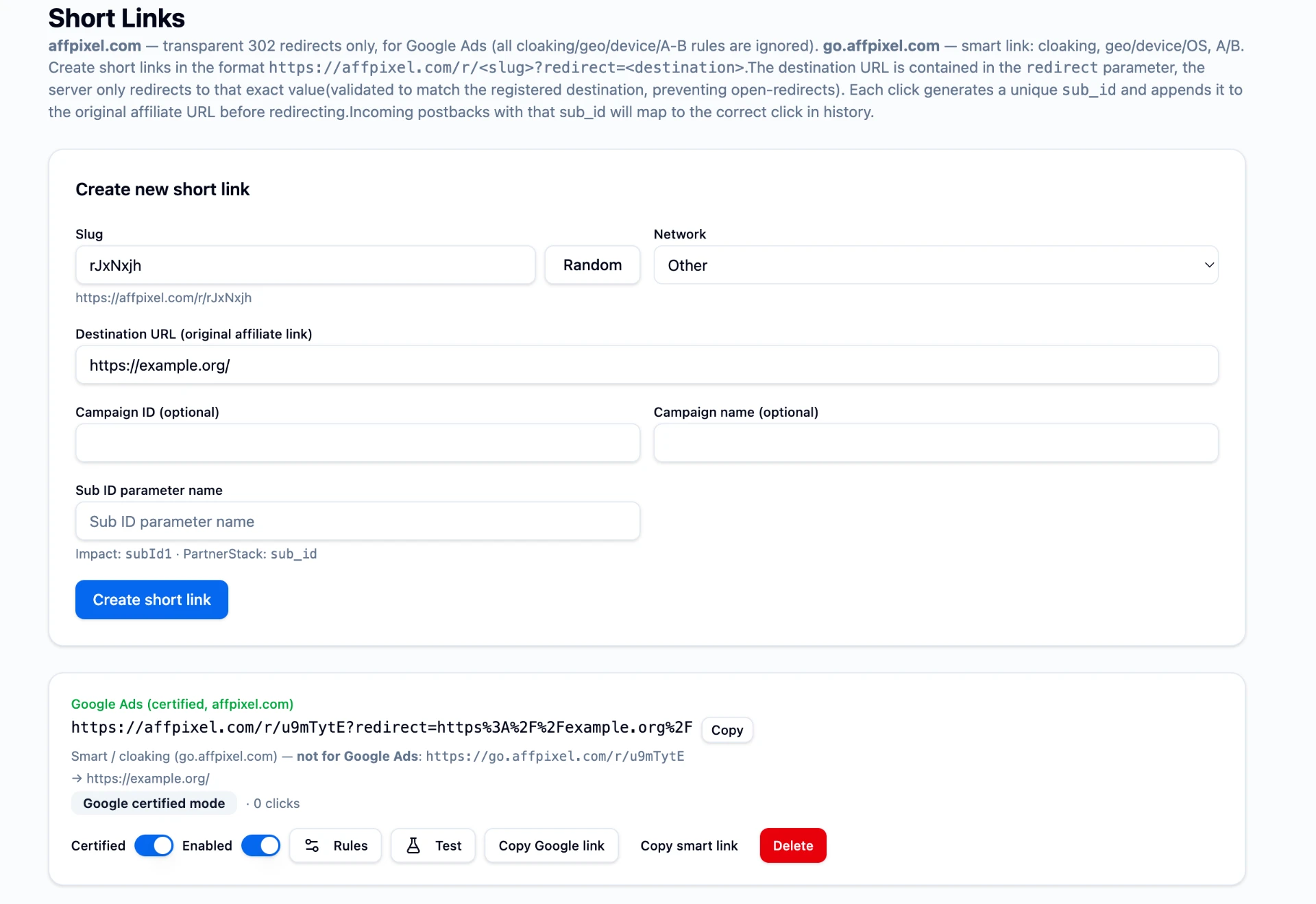
https://affpixel.com/r/<slug>?redirect=<url-encoded destination>The destination lives in the redirect parameter and is validated against the destination registered for that slug, so the link can't be turned into an open redirect. The server answers with exactly one HTTP 302 — no JavaScript, no meta refresh, no interstitial.
Creating a link
- Open /shortlinks.
- Keep the generated slug or click Random, or type your own.
- Pick the network (leave Other if yours isn't listed).
- Paste the destination affiliate URL.
- Optionally add a Campaign ID / name, and a Sub ID parameter name —
subId1for Impact,sub_idfor PartnerStack. Leave it blank if the network shouldn't receive a sub ID. - Click Create short link and copy either the Google link or the smart link.
Automatic sub_id and postback matching
On every click AffPixel generates a unique sub_id, appends it to the affiliate URL under your chosen parameter name, and stores the click together with any gclid, fbclid or ttclid present. When the network fires its postback with that same sub ID, the conversion is attributed to the original click — and can be forwarded to Google Ads, Meta or TikTok automatically.
Google certified mode
Toggle Certified on a link and AffPixel enforces the Certified Click Tracker rules: HTTPS only, one hop, no cloaking or rule-based switching, and no-store plus noindex headers. Invalid or mismatched destinations return 400 instead of redirecting. Use Test in the link row to verify the behaviour before the link goes into an ad.
Good practice
- Use one link per campaign so reporting stays readable.
- Never point a Google Ads final URL at go.affpixel.com.
- Make sure the destination matches your display URL's site.
- Check clicks on the link row before scaling spend.
Related: Affiliate Cloaking and Google Ads Policy · SubID Tracking Explained.